

This blog is part of the VTPP (VNET Threat Perception Platform) project, a three-year programme co-funded by the European Commission under the DIGITAL-ECCC-2022-CYBER-03 call. The project covers DDoS mitigation with FastNetMon, vulnerability scanning with OpenVAS, custom AI/ML detection plugins for Zeek, HSM-backed key management, RPKI validation and a Krill CA, and a full-scale deployment of Security Onion as the IDS/SIEM/NSM backbone.
As a rapidly growing service provider offering Internet connectivity, Server/Rack Housing, SaaS, IaaS, VoIP and other services — with tens of thousands of public IP addresses — we are frequently targeted by application-layer and volumetric DDoS attacks. Given our clients‘ roles in national critical infrastructure, we require a security posture that exceeds standard industry benchmarks.
We needed a system that could effectively handle attacks without overspending or requiring 24/7 manual intervention.
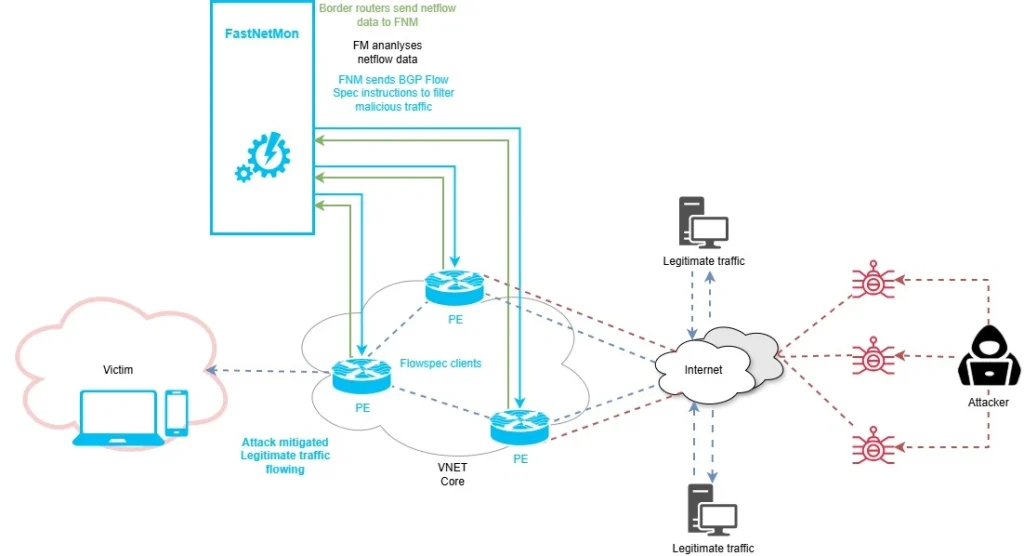
Our solution? A highly available, automated detection and mitigation stack built on FastNetMon. By leveraging NetFlow exports from our edge routers, we’ve implemented a three-tier complementary defense strategy:
1. First line of defense: BGP FlowSpec
For precision, we use BGP FlowSpec. Once FastNetMon detects a signature that matches our fine-tuned rules, it dynamically generates and injects traffic-dampening rules into our edge routers.
Think of this as a dynamic QoS: instead of killing all traffic to a target, we can drop or limit specific malicious packets (like a UDP frag flood) while keeping the customer’s legitimate TCP traffic flowing.
Unfortunately, this is not enough in all cases — current attacks are very sophisticated, and this technique by itself might not always be successful or sufficient.
2. Automated Scrubbing Redirection
For complex attacks where we cannot afford any downtime, we redirect traffic to an external Scrubbing Center. FastNetMon acts as the intelligent control plane here. Rather than paying for „always-on“ scrubbing (which is expensive and adds latency), FastNetMon detects the threat and uses BGP to redirect the affected prefix (usually /24) to the scrubbing provider. The malicious traffic is filtered out, and „clean“ traffic is returned to us via a dedicated link.
3. RTBH (Remotely Triggered Black Hole)
If both previous lines of defense fail and the volumetric attack is too large for our infrastructure to absorb, we trigger RTBH. FastNetMon automatically signals our upstream providers to drop traffic destined to the targeted IP at their network edge. This ensures the malicious traffic never even reaches our network, preserving bandwidth for our other non-targeted customers. Unfortunately, in this case the attack is successful as the destination becomes unreachable, but its impact is usually limited to a single host IP.
To build this Anti-DDoS solution, we used the OpenStack virtualization platform, where four instances of FastNetMon are deployed on separate VMs. This is needed both for high availability and because BGP Blackhole/Redirect and BGP Flowspec on FastNetMon require separation and cannot run in parallel on a single instance. They work in two mutually exclusive modes.
I will not focus on installation and licensing details, as it is very easy to install using the FastNetMon official installation guide online. You can use a physical server or a broad selection of virtualization platforms such as VMware, Hyper-V, KVM, Proxmox, Xen, Google Cloud Compute, Amazon AWS or Microsoft Azure and different Linux distributions as operating system (Ubuntu Linux 22.04, 24.04 (recommended) LTS, Debian Linux 12, 13, RHEL-based platforms (CentOS, AlmaLinux, RockyLinux) 8, 9).
If you want these cool visual dashboards, you will need a few additional steps to enable traffic visualization based on Grafana (Clickhouse is used as a database).
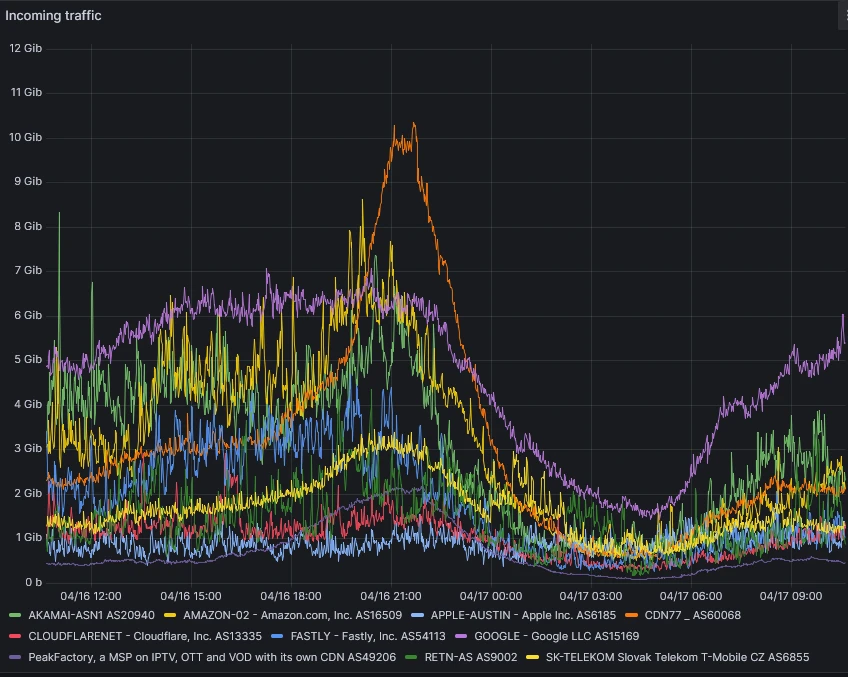
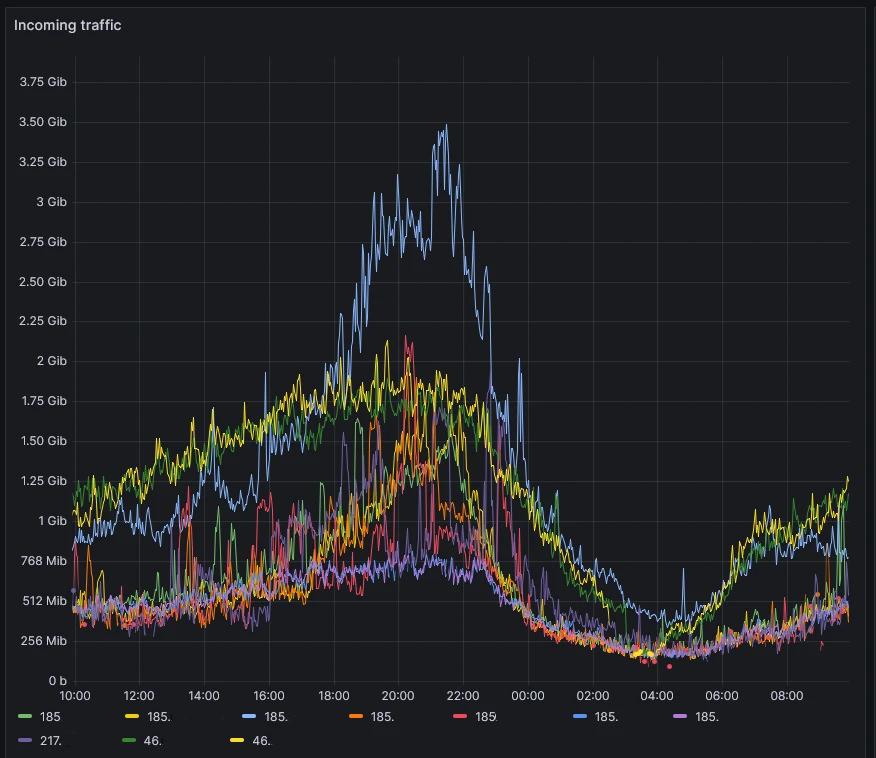
The first step in setting up FNM is to configure traffic capture on your border routers towards the internet. We use Netflow v9 but there are other options such as sFlow, port mirroring or others. Port mirroring and sFlow provide the fastest bandwidth calculation times (1-2 seconds), but it all depends on the specific needs and capabilities of your organization. Even Netflow v9 with proper traffic sampling ensures fast and reliable detection times, usually between 2-5 seconds in our environment. After Netflow traffic is being exported, we also need to enumerate all of your organization’s networks for traffic calculations directly in the FastNetMon CLI.
sudo fcli set main networks_list 86.110.224.0/19
sudo fcli set main networks_list 2a01:390::/32
sudo fcli commit
If you want to check if FNM is accepting flows and calculating traffic, you can use following command:
fastnetmon_client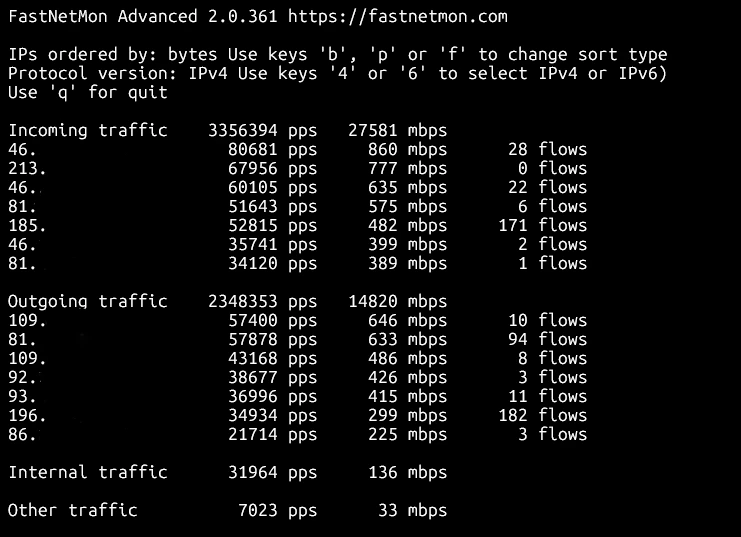
Since this solution consists of more than one instance, it’s paramount to set the detection thresholds for activating individual techniques properly. FastNetMon supports custom per-host thresholds and allows us to configure host-groups which can be utilized for assigning different customers to different groups based on their needs.
For example, we could trigger both Flowspec and automatic redirection to the scrubbing center at the same time for certain destination prefixes (important customers) using same threshold e.g. 10 Gbit/s of UDP flood traffic per host on both instances. In another case, we could only activate Flowspec for other customers at the level of 1 Gbit/s per host and use blackholing if the Flowspec defense is unsuccessful and traffic levels reach 10 Gbit/s per host.
These are the threshold settings for testing purposes. As we can see, FastNetMon supports a lot of different parameters that we can use to tweak detection of different attack vectors such as TCP SYN packets per second or UDP flood Mbits per second:
ban_for_bandwidth: true
ban_for_bandwidth_outgoing: false
ban_for_flows: false
ban_for_flows_outgoing: false
ban_for_icmp_bandwidth: true
ban_for_icmp_bandwidth_outgoing: false
ban_for_icmp_pps: true
ban_for_icmp_pps_outgoing: false
ban_for_ip_fragments_bandwidth: true
ban_for_ip_fragments_bandwidth_outgoing: false
ban_for_ip_fragments_pps: true
ban_for_ip_fragments_pps_outgoing: false
ban_for_pps: true
ban_for_pps_outgoing: false
ban_for_tcp_bandwidth: false
ban_for_tcp_bandwidth_outgoing: false
ban_for_tcp_pps: false
ban_for_tcp_pps_outgoing: false
ban_for_tcp_syn_bandwidth: true
ban_for_tcp_syn_bandwidth_outgoing: false
ban_for_tcp_syn_pps: true
ban_for_tcp_syn_pps_outgoing: false
ban_for_udp_bandwidth: true
ban_for_udp_bandwidth_outgoing: false
ban_for_udp_pps: true
ban_for_udp_pps_outgoing: false
calculation_method: per_host
description:
enable_ban: true
enable_ban_incoming: true
enable_ban_outgoing: false
enable_bgp_flow_spec: true
flexible_thresholds:
name: flowspec_testing
networks: 10.255.255.0/24
parent_name:
threshold_flows: 0
threshold_flows_outgoing: 0
threshold_icmp_mbps: 100
threshold_icmp_mbps_outgoing: 0
threshold_icmp_pps: 30000
threshold_icmp_pps_outgoing: 0
threshold_ip_fragments_mbps: 500
threshold_ip_fragments_mbps_outgoing: 0
threshold_ip_fragments_pps: 10000
threshold_ip_fragments_pps_outgoing: 0
threshold_mbps: 10000
threshold_mbps_outgoing: 0
threshold_pps: 10000000
threshold_pps_outgoing: 0
threshold_tcp_mbps: 0
threshold_tcp_mbps_outgoing: 0
threshold_tcp_pps: 0
threshold_tcp_pps_outgoing: 0
threshold_tcp_syn_mbps: 1000
threshold_tcp_syn_mbps_outgoing: 0
threshold_tcp_syn_pps: 200000
threshold_tcp_syn_pps_outgoing: 0
threshold_udp_mbps: 500
threshold_udp_mbps_outgoing: 0
threshold_udp_pps: 500000
threshold_udp_pps_outgoing: 0
We can specify whether we want to enable an action based on reaching threshold for bandwidth or number of flows or packets per second or all of them. If not set differently, FastNetMon calculates these parameters for each end host IP in host group separately by default and triggers action only for that IP.
To enforce mitigation actions, we need to configure BGP peerings first. We need following data:
- Peering IP for FastNetMon
- ASN for FastNetMon
- Router’s IP
- Router’s ASN
This is the actual configuration. Note that FastNetMon features complete support for GoBGP.
sudo fcli set main gobgp enable
sudo fcli set bgp connection_to_test_XRv_router
sudo fcli set bgp connection_to_test_XRv_router local_asn 64666
sudo fcli set bgp connection_to_test_XRv_router remote_asn 64666
sudo fcli set bgp connection_to_test_XRv_router local_address 192.168.99.66
sudo fcli set bgp connection_to_test_XRv_router remote_address 10.201.254.249
sudo fcli set bgp connection_to_test_XRv_router multihop enable
sudo fcli set bgp connection_to_test_XRv_router ipv4_unicast enable
sudo fcli set bgp connection_to_test_XRv_router ipv4_flowspec enable
sudo fcli set bgp connection_to_test_XRv_router active enable
sudo fcli commit
Obviously, you also need to configure the peer on the router side, but since that is platform dependent, I will not focus on it here. Usually, you want peerings to all your border routers or peerings towards route reflectors in your ASN. You can check the status of the peering:
gobgp neighbor
gobgp neighbor 10.201.254.249
Besides triggering BGP action (redirect/blackhole or flowspec rule) FastNetMon supports notifications after triggering action. It includes Slack or Telegram integration, web callbacks, calling scripts or even integrations with some cloud scrubbing services such as Cloudflare or F5. As a basic notification we can use email.
sudo fcli set main email_notifications_enabled enable
sudo fcli set main email_notifications_tls enable
sudo fcli set main email_notifications_auth enable
sudo fcli set main email_notifications_port 587
sudo fcli set main email_notifications_host <censored>
sudo fcli set main email_notifications_from <censored>
sudo fcli set main email_notifications_username <censored>
sudo fcli set main email_notifications_password <censored>
sudo fcli set main email_notifications_recipients <censored>
To test our scenario, we can start an UDP flood or any other DDoS vector from linux host under our management within our autonomous system using hping3 utility. Host needs to be connected on the border router, so the flow is exported using Netflow to FastNetMon.
sudo hping3 --rand-source --flood --data 256 -2 -p 5000 10.255.255.11FNM calculates bandwidth and PPS for each host almost in real time, so it quickly detects that incoming UDP traffic towards host 10.255.255.11 exceeds the configured threshold of 500 Mb/s. It triggers an action; in this case it generates flowspec rule:
<JSON>
admin@fastnetmon:~$ sudo fcli show flowspec
{"action_type":"discard","destination_ports":[5000],"destination_prefix":"10.255.255.11/32","packet_lengths":[284],"protocols":["udp"]} 06cdd52b-968d-4086-baf8-fc3cc907071e
We can also check the rules on the border router:
RP/0/RSP0/CPU0:dc4-asr9901#sh bgp ipv4 flowspec
Status codes: s suppressed, d damped, h history, * valid, > best
              i - internal, r RIB-failure, S stale, N Nexthop-discard
Origin codes: i - IGP, e - EGP, ? - incomplete
   Network            Next Hop            Metric LocPrf Weight Path
*> Dest:10.255.255.11/32,Proto:=17,DPort:=5000,Length:=284/136
                      0.0.0.0                                0 64666 ?
And most importantly, if we have correctly configured flowspec client mode and enforcing action on the border router, we can see that it’s dropping the offending traffic:
RP/0/RSP0/CPU0:dc4-asr9901#sh flowspec ipv4 detail
AFI: IPv4
  Flow           :Dest:10.255.255.11/32,Proto:=17,DPort:=5000,Length:=284
    Actions      :Traffic-rate: 0 bps  (bgp.1)
    Statistics                        (packets/bytes)
      Matched             :            99476287/30041838674
      Dropped             :            99476287/30041838674
And most importantly, if we have correctly configured flowspec client mode and enforcing action on the border router, we can see that it’s dropping the offending traffic:
RP/0/RSP0/CPU0:dc4-asr9901#sh flowspec ipv4 detail
AFI: IPv4
  Flow           :Dest:10.255.255.11/32,Proto:=17,DPort:=5000,Length:=284
    Actions      :Traffic-rate: 0 bps  (bgp.1)
    Statistics                        (packets/bytes)
      Matched             :            99476287/30041838674
      Dropped             :            99476287/30041838674
Which is exactly what we see in Graphana visual dashboard:
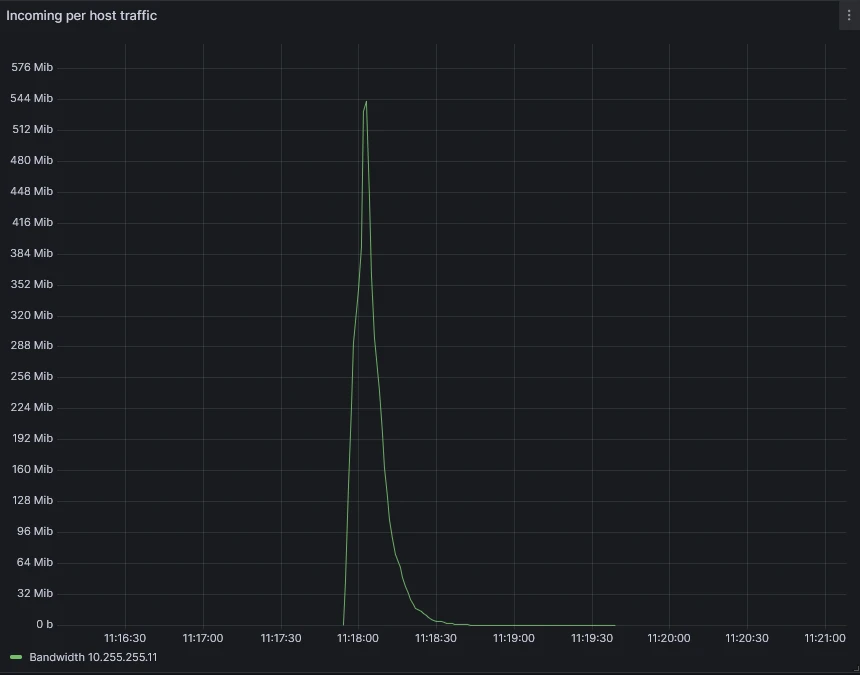
Finally, we can check the email report which provides not only the summary of the attack but also packet dump and generated flowspec rule.
Real-World Example: The 3:00 AM Test
The true value of this stack is best illustrated by a real-world event. On April 12, 2026, while our engineering team was asleep, the system was put to the test by a massive 32.4 Gbps UDP flood.
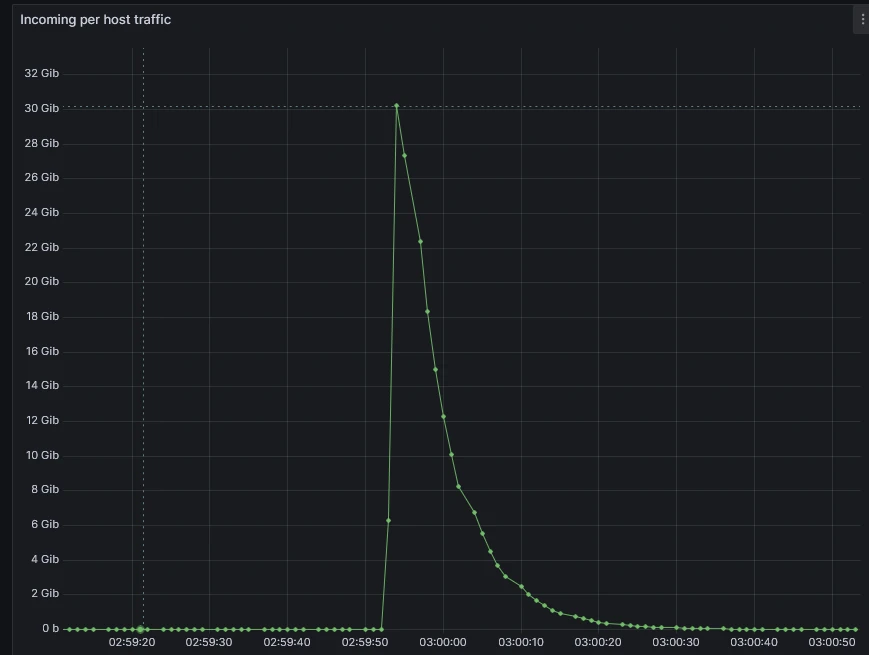
The notification email we received (shown below) provides a transparent look at how FastNetMon handles a medium severity attack targeting a specific host on port 27015.
Incident Summary:
- Peak Attack Power: 3,444,529 PPS / 32,442 Mbps
- Vector: UDP Flood
- Mitigation: Automated Flowspec discard rule
As shown in the packet dump included in the report, FastNetMon identified the specific signature of the flood. Within seconds, it injected a discard rule into our Cisco ASR edge routers.
As a result, the 32 Gbps attack was stopped at our network perimeter. Because we used Flowspec rather than a total Blackhole, the customer remained fully reachable for all other services.
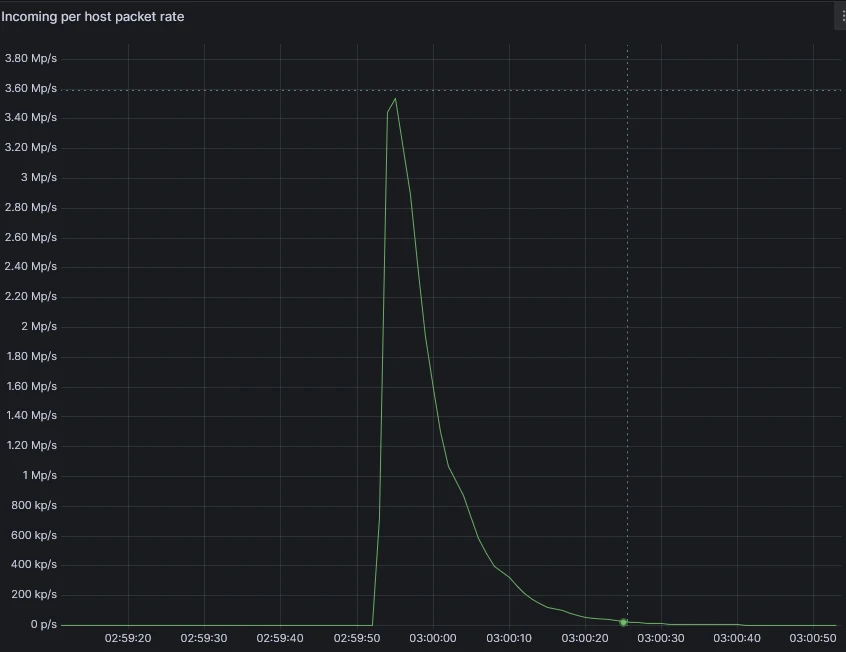
Here is the report. Note that attack target and border router IP have been censored.
-----Original Message-----
From: ddos.notification <censored>
Sent: Sunday, April 12, 2026 3:00 AM
To: <censored>
Subject: FastNetMon partially blocked traffic for host <attack target>

IP: <attack target>
Attack uuid: 292d1fc9-81b5-4aeb-b699-e6b6ba037916
Attack severity: middle
Attack type: udp_flood
Initial attack power: 3444529 packets per second Peak attack power: 3444529 packets per second Attack direction: incoming Attack protocol: udp Detection threshold: bytes per second Detection threshold direction: incoming Detection source: automatic Host group: global Parent host group:
Host network: <censored>
Protocol version: IPv4
Total incoming traffic: 32442 mbps
Total outgoing traffic: 0 mbps
Total incoming pps: 3444529 packets per second Total outgoing pps: 64 packets per second Total incoming flows: 200 flows per second Total outgoing flows: 0 flows per second Incoming ip fragmented traffic: 0 mbps Outgoing ip fragmented traffic: 0 mbps Incoming ip fragmented pps: 0 packets per second Outgoing ip fragmented pps: 0 packets per second Incoming dropped traffic: 0 mbps Outgoing dropped traffic: 0 mbps Incoming dropped pps: 0 packets per second Outgoing dropped pps: 0 packets per second Incoming tcp traffic: 0 mbps Outgoing tcp traffic: 0 mbps Incoming tcp pps: 24 packets per second Outgoing tcp pps: 29 packets per second Incoming syn tcp traffic: 0 mbps Outgoing syn tcp traffic: 0 mbps Incoming syn tcp pps: 0 packets per second Outgoing syn tcp pps: 0 packets per second Incoming udp traffic: 32442 mbps Outgoing udp traffic: 0 mbps Incoming udp pps: 3444501 packets per second Outgoing udp pps: 32 packets per second Incoming icmp traffic: 0 mbps Outgoing icmp traffic: 0 mbps Incoming icmp pps: 0 packets per second Outgoing icmp pps: 0 packets per second


Packets dump

2026-04-12 02:59:55.000000 109.78.253.36:54706 > <attack target>:27015 protocol: udp frag: 0  packets: 16 size: 18060 bytes ip size: 18060 bytes ttl: 0 sample ratio: 32 agent: <border router>
2026-04-12 02:59:55.000000 24.152.18.119:57705 > <attack target>:27015 protocol: udp frag: 0  packets: 421 size: 498496 bytes ip size: 498496 bytes ttl: 0 sample ratio: 32 agent: <border router>
2026-04-12 02:59:55.000000 102.182.184.39:44482 > <attack target>:27015 protocol: udp frag: 0  packets: 51 size: 59299 bytes ip size: 59299 bytes ttl: 0 sample ratio: 32 agent: <border router>
2026-04-12 02:59:55.000000 92.162.160.94:58166 > <attack target>:27015 protocol: udp frag: 0  packets: 411 size: 484129 bytes ip size: 484129 bytes ttl: 0 sample ratio: 32 agent: <border router>
2026-04-12 02:59:55.000000 45.190.106.68:12462 > <attack target>:27015 protocol: udp frag: 0  packets: 205 size: 241872 bytes ip size: 241872 bytes ttl: 0 sample ratio: 32 agent: <border router>
2026-04-12 02:59:55.000000 170.254.201.170:5107 > <attack target>:27015 protocol: udp frag: 0  packets: 803 size: 944316 bytes ip size: 944316 bytes ttl: 0 sample ratio: 32 agent: <border router>
2026-04-12 02:59:55.000000 201.7.218.192:53304 > <attack target>:27015 protocol: udp frag: 0  packets: 500 size: 588396 bytes ip size: 588396 bytes ttl: 0 sample ratio: 32 agent: <border router>
2026-04-12 02:59:55.000000 181.192.99.79:2234 > <attack target>:27015 protocol: udp frag: 0  packets: 5 size: 5854 bytes ip size: 5854 bytes ttl: 0 sample ratio: 32 agent: <border router>
2026-04-12 02:59:55.000000 187.16.187.104:43904 > <attack target>:27015 protocol: udp frag: 0  packets: 675 size: 798563 bytes ip size: 798563 bytes ttl: 0 sample ratio: 32 agent: <border router>
2026-04-12 02:59:55.000000 187.103.67.248:8153 > <attack target>:27015 protocol: udp frag: 0  packets: 48 size: 56619 bytes ip size: 56619 bytes ttl: 0 sample ratio: 32 agent: <border router>
2026-04-12 02:59:55.000000 189.84.233.130:48738 > <attack target>:27015 protocol: udp frag: 0  packets: 345 size: 406272 bytes ip size: 406272 bytes ttl: 0 sample ratio: 32 agent: <border router>
2026-04-12 02:59:55.000000 45.181.58.40:9977 > <attack target>:27015 protocol: udp frag: 0  packets: 87 size: 100828 bytes ip size: 100828 bytes ttl: 0 sample ratio: 32 agent: <border router>
2026-04-12 02:59:55.000000 186.209.206.168:38768 > <attack target>:27015 protocol: udp frag: 0  packets: 43 size: 48736 bytes ip size: 48736 bytes ttl: 0 sample ratio: 32 agent: <border router>
2026-04-12 02:59:55.000000 103.138.253.14:56001 > <attack target>:27015 protocol: udp frag: 0  packets: 259 size: 315776 bytes ip size: 315776 bytes ttl: 0 sample ratio: 32 agent: <border router>
2026-04-12 02:59:55.000000 186.237.173.140:54756 > <attack target>:27015 protocol: udp frag: 0  packets: 201 size: 238193 bytes ip size: 238193 bytes ttl: 0 sample ratio: 32 agent: <border router>
2026-04-12 02:59:55.000000 179.109.1.24:54818 > <attack target>:27015 protocol: udp frag: 0  packets: 50 size: 58302 bytes ip size: 58302 bytes ttl: 0 sample ratio: 32 agent: <border router>
2026-04-12 02:59:55.000000 82.79.210.183:50663 > <attack target>:27015 protocol: udp frag: 0  packets: 693 size: 817264 bytes ip size: 817264 bytes ttl: 0 sample ratio: 32 agent: <border router>
2026-04-12 02:59:55.000000 190.105.222.239:43025 > <attack target>:27015 protocol: udp frag: 0  packets: 211 size: 246241 bytes ip size: 246241 bytes ttl: 0 sample ratio: 32 agent: <border router>
2026-04-12 02:59:55.000000 187.84.7.196:17187 > <attack target>:27015 protocol: udp frag: 0  packets: 16 size: 18582 bytes ip size: 18582 bytes ttl: 0 sample ratio: 32 agent: <border router>
2026-04-12 02:59:55.000000 81.102.216.74:34359 > <attack target>:27015 protocol: udp frag: 0  packets: 420 size: 489322 bytes ip size: 489322 bytes ttl: 0 sample ratio: 32 agent: <border router>
2026-04-12 02:59:55.000000 45.177.78.109:18769 > <attack target>:27015 protocol: udp frag: 0  packets: 19 size: 22194 bytes ip size: 22194 bytes ttl: 0 sample ratio: 32 agent: <border router>
2026-04-12 02:59:55.000000 172.97.140.184:54220 > <attack target>:27015 protocol: udp frag: 0  packets: 1438 size: 1709876 bytes ip size: 1709876 bytes ttl: 0 sample ratio: 32 agent: <border router>
2026-04-12 02:59:55.000000 82.9.28.11:56556 > <attack target>:27015 protocol: udp frag: 0  packets: 327 size: 384288 bytes ip size: 384288 bytes ttl: 0 sample ratio: 32 agent: <border router>
2026-04-12 02:59:55.000000 187.190.105.6:24325 > <attack target>:27015 protocol: udp frag: 0  packets: 1282 size: 1523248 bytes ip size: 1523248 bytes ttl: 0 sample ratio: 32 agent: <border router>
2026-04-12 02:59:55.000000 47.146.152.107:45788 > <attack target>:27015 protocol: udp frag: 0  packets: 1719 size: 2028442 bytes ip size: 2028442 bytes ttl: 0 sample ratio: 32 agent: <border router>
<JSON>
Flow spec rules:

{"action_type":"discard","destination_ports":[27015],"destination_prefix":"<attack target>/32","protocols":["udp"],"uuid":"389c7db3-a080-4c93-b5b0-17daa33e4b19"}
The deployment of a multi-tier FastNetMon architecture on OpenStack provides a scalable, low-latency solution for managing high-volume volumetric attacks. By moving the detection plane to an automated telemetry-based system, we have effectively minimized our Mean Time to Mitigate (MTTM) from possibly hours to seconds.
Key Performance Advantages:
- Granular Traffic Scrubbing: The transition from RTBH to BGP Flowspec allows for the preservation of legitimate customer traffic during an attack. As demonstrated in our 32 Gbps incident, we can isolate specific L4 protocols and destination ports (e.g., UDP/27015) while maintaining reachability for the host’s remaining services.
- Autonomous Mitigation Execution: The primary advantage of this stack is the automated generation and propagation of BGP rules. Whether the optimal response is a Flowspec filter, a redirection to an external scrubbing center, or an RTBH trigger, the system executes the peering update without manual intervention
- Automated Incident Documentation and Visualization: The integration of automated email reporting and Grafana visualization replaces manual forensic data gathering. Email reports also serve as a quick incident history log.
In a modern ISP network, manual intervention is no longer a viable strategy for DDoS mitigation. The combination of GoBGP for rapid rule propagation and FastNetMon for automated signature detection creates a resilient control plane capable of handling even the largest attacks automatically.

Views and opinions expressed are however those of the author(s) only and do not necessarily reflect those of the European Union or the European Cybersecurity Competence Centre. Neither the European Union nor the granting authority can be held responsible for them.